
A budget is a plan for money you have not spent yet. Most people who try one give up because they start by tracking every past expense in detail — which is laborious and tells you only what already happened. Deciding in advance where the money goes is the part that changes anything.
Below are 18 free personal budget templates in MS Word and MS Excel: monthly planners, weekly trackers, household budgets, debt and savings trackers and bill calendars. All fields are editable, and the Excel versions total as you type.
1. Simple Monthly Budget

Income at the top, expenses beneath, what is left at the bottom. The plainest option and the one most likely to still be in use in three months.
MS WORDDownload Now ↓
2. Monthly Budget by Category

Spending grouped into housing, food, transport, utilities and personal, each with its own subtotal. Categories are what show you where the money actually goes, as opposed to that it went.
MS EXCELDownload Now ↓
3. Weekly Budget Tracker

Seven days across one page with a running total. A month is too long a feedback loop when you are first getting a grip on spending; a week is short enough to correct.
MS WORDDownload Now ↓
4. Annual Budget Overview

Twelve months across, categories down, with yearly totals. The view that catches the expensive months — insurance renewals, school costs, festivals — before they arrive rather than after.
MS EXCELDownload Now ↓
5. Zero-Based Budget
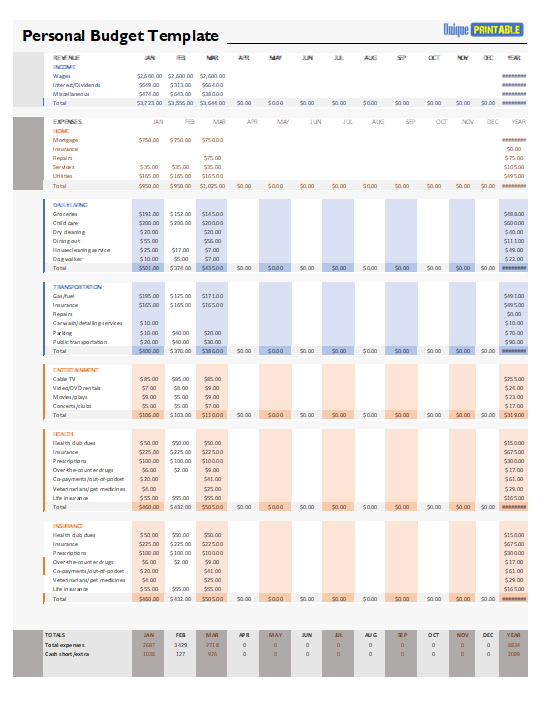
Every unit of income is assigned a job — spending, saving or debt — until nothing is unallocated. Demanding to maintain, but it is the method that stops money quietly disappearing into nothing in particular.
MS EXCELDownload Now ↓
6. Percentage Allocation Budget

Splits income into proportions — essentials, discretionary spending and savings or debt. The widely quoted 50/30/20 split is a starting point rather than a rule; adjust it to your rent and your income, since in many cities housing alone exceeds half.
MS EXCELDownload Now ↓
7. Household and Family Budget

Combined income from more than one earner, shared household costs and child-related expenses. Filling it in together is most of the value — two people guessing separately at the same household’s spending rarely agree.
MS EXCELDownload Now ↓
8. Student Budget

Built around terms rather than months, with tuition, rent, books and part-time income. Student money arrives in large infrequent lumps and has to last, which a standard monthly budget handles badly.
MS WORDDownload Now ↓
9. Daily Expense Tracker

A line per purchase: date, item, category, amount. Worth doing for two or three weeks when you genuinely do not know where the money goes, then stopping once the pattern is clear.
MS WORDDownload Now ↓
10. Budget vs Actual Comparison

Planned, actual and the difference, side by side. This is the template that makes a budget useful rather than decorative, because the variance column is where next month’s plan comes from.
MS EXCELDownload Now ↓
11. Debt Repayment Tracker

Each debt with its balance, interest rate, minimum payment and a running total as it reduces. Listing every debt in one place is uncomfortable and necessary — you cannot prioritise repayments you have not written down. Record each payment on a loan payment slip if you pay in person.
MS EXCELDownload Now ↓
12. Savings Goal Tracker

A target, a deadline, the monthly amount required and a progress bar to colour in. Naming what the money is for makes it considerably easier not to spend.
MS WORDDownload Now ↓
13. Bill Payment Calendar

Every recurring bill with its due date, amount and a box to tick when paid. Late fees are the most avoidable expense there is, and they are almost always a memory problem rather than a money one.
MS WORDDownload Now ↓
14. Budget with Summary Charts

Enter the figures and the charts update, showing spending by category as proportions. Seeing a category as a slice rather than a number tends to be more persuasive than the arithmetic alone.
MS EXCELDownload Now ↓
15. Variable Income Budget

For freelance, commission or seasonal income: a baseline of essential costs, budgeting from your lowest likely month rather than your average. The surplus in good months covers the thin ones instead of disappearing.
MS EXCELDownload Now ↓
16. Shared and Couples Budget

Separate columns for each person’s income and contribution, with shared costs split either equally or in proportion to earnings. Also works for flatmates dividing household bills.
MS EXCELDownload Now ↓
17. Cash Envelope Budget

Allocates cash to named categories, with a tracking sheet per envelope. For anyone who overspends on cards, physical cash running out is a limit that a balance on a screen does not provide.
MS WORDDownload Now ↓
18. Blank Budget Template

Headings and ruled rows with no categories preset, so you can name your own. Worth using once you know which categories you actually spend in, rather than adopting a generic list.
MS WORDDownload Now ↓
Which Budget Template Should You Use?
- Starting out — template 1. Keep it simple until the habit holds.
- No idea where the money goes — template 9 for a fortnight, then template 2.
- Income arrives irregularly — template 15.
- Paying down debt — template 11 alongside a monthly budget.
- Saving for something specific — template 12.
- Two people, shared costs — template 16.
- Budget exists but keeps failing — template 10, which shows where the plan and reality diverge.
How to Build a Budget That Survives
- Start with income you can rely on. Net pay after deductions, not gross, and the amount you can count on rather than a good month.
- List fixed costs next. Rent, utilities, loan payments, insurance, subscriptions. These are not negotiable this month, so they come out first.
- Add annual costs divided by twelve. Insurance renewals, festivals, school fees, car servicing. Not doing this is why budgets collapse in the month something large arrives.
- Set aside savings before discretionary spending, not from what happens to be left. Even a small fixed amount works better than an intention.
- Budget the rest by category, and be realistic. A food budget below what you actually spend is a budget you will break in week two and then abandon entirely.
- Leave a buffer for the unexpected. Something comes up most months. A plan with no slack fails on the first occasion rather than absorbing it.
- Review monthly and adjust. Compare planned against actual, move the figures that were wrong, and keep going. A budget is a working estimate, not a test you pass or fail.
- Expect the first two months to be wrong. Everyone underestimates. The third month is usually when the numbers start resembling reality.
What Makes Budgets Work
Planning Beats Recording
Tracking expenses tells you what happened. Deciding in advance what each category gets is what changes the outcome. Tracking is useful mainly as the feedback that makes the next plan better.
Categories Should Match Your Life
A generic template may have categories you never use and omit the ones you spend most on. Rename them within the first month so the budget describes your spending rather than a stranger’s.
Annual Costs Are What Break Budgets
Monthly spending is usually estimated reasonably well. It is the once-a-year expenses that arrive as a shock. Dividing them by twelve and setting the money aside is the single most effective habit here.
It Connects to Everything Else
Income recorded on your salary slips is the top line of the budget, and for one-off costs an event budget keeps a wedding or holiday out of the monthly figures where it would distort everything.
Frequently Asked Questions
How much of my income should I save?
There is no figure that applies to everyone. Commonly cited guidelines suggest around a fifth of net income, but what is realistic depends entirely on your rent, your income and your commitments — and in many places housing alone takes more than half. Saving a small amount consistently is worth more than an ambitious target you abandon.
What is a zero-based budget?
One where every unit of income is assigned to a category — spending, saving or debt repayment — so the plan balances to zero. It does not mean spending everything; savings are one of the allocations. It is thorough but demanding, and many people prefer a simpler category budget.
Why do my budgets keep failing?
Usually one of three things: the figures were optimistic rather than realistic, annual costs were not spread across the months, or there was no buffer for the unexpected. Rebuilding with higher, honest numbers works better than trying harder against a plan that was never achievable.
Should I use a printed budget or an app?
Whichever you will actually keep up. Apps automate the tracking; paper makes you engage with each figure, which some people find more effective. Many use a printed monthly plan alongside automatic bank categorisation.
What if my expenses exceed my income?
A budget will show you that clearly, which is the first useful step, but it cannot resolve it on its own. If the shortfall is persistent or debt is becoming unmanageable, free and impartial debt advice services exist in most countries, often run by charities or government bodies. Speaking to one early generally gives more options than waiting, and they are free — be cautious of any service that charges to arrange debt solutions.
Can I edit these templates in Google Sheets?
Yes. Upload the file to Google Drive and choose Open with → Google Sheets for the Excel versions or Google Docs for the Word ones. Formulas carry across in most cases, though it is worth checking the totals after converting.

