The best workplace schedule template is the one that matches how your team actually works. A weekly grid suits shops, clinics and offices with steady hours. A monthly roster suits teams that plan ahead. A rotating pattern suits round-the-clock coverage, a daily sheet suits hour-by-hour work, and an availability form suits managers who first need to know who can work when. Choose the layout first, then the file format: Word for printed schedules, Excel for anything that adds up hours.
Finding a staff schedule template is easy. Finding one that fits your shifts, opens in the software you own and prints cleanly is harder. Many results are blank grids you have to rebuild, files locked as PDFs, or downloads behind a sign-up. This article walks through five types of employee schedule template, what each one covers, who it suits and how to set it up. A final section shows how to choose, edit, share and export the one you pick.
Every type below is available from Unique Printable, a free library of more than 400 editable Word and Excel templates. You can download them without an account or email address, use them in your business and add your own branding. You just can’t resell the files.
1. Weekly shift schedule
A weekly shift schedule is the right starting point for most teams. It puts seven days across the page with one row per employee, so you see coverage, gaps and days off at a glance.

What the template covers
Unique Printable’s weekly set has 10 editable Word layouts: simple seven-day planners, hourly grids, work-week sheets, team schedules, household planners and blank pages. You change the start day, time slots and column headings, then print. If you want a weekly rota in Excel, the employee work schedule set includes rotas in both Word and Excel, and each download lists its file format.
Keep these columns on any weekly employee schedule:
- Employee name and role
- Start and end time for each day
- Unpaid break length
- Total hours for the week
Who it suits and how to use it
Weekly schedules fit retail, restaurants, clinics and small offices where hours repeat from week to week. If your staff work the same pattern most weeks, you only edit the exceptions.
Set your names and operating hours once, then save the file as a master copy. Use Save As for each new week and post the printed copy where staff look. Send the PDF to anyone who works remotely.
A weekly schedule saves the most time when you build it once and only change the exceptions.
2. Monthly staff roster
A monthly staff roster shows four to five weeks on one page, which gives employees time to plan childcare, classes and second jobs. Use it when you need to schedule ahead of busy periods.
What the template covers
Unique Printable’s monthly set has 10 Word templates: calendar grids, hourly slots, shift rosters, appointments, study plans, project timelines and chore schedules. Templates 2, 3 and 8 are landscape, which gives long names more room. The default paper size is A4, and switching to US Letter takes one change in Page Setup, after which the table adjusts.
Mark these on the roster before you assign any shifts:
- Public holidays and closures
- Approved leave
- Training or on-call days
- Fixed commitments such as inventory counts
Who it suits and how to use it
Teams with fixed rotations, clinics, schools and seasonal businesses get the most from a roster. A month view also exposes uneven distribution, such as one person closing every Friday.
Build notice into your routine. Some US cities and states have predictive scheduling laws that require advance notice of schedules for certain employers, so check local rules before you set your publishing date. Whatever the rule, a roster published early cuts last-minute swaps.
A monthly roster turns scheduling from a weekly scramble into a planned task.
3. Rotating shift pattern
A rotating shift pattern repeats a fixed cycle of work and rest days, so every crew shares nights and weekends fairly. Use it when your workplace needs 24/7 coverage.
What the template covers
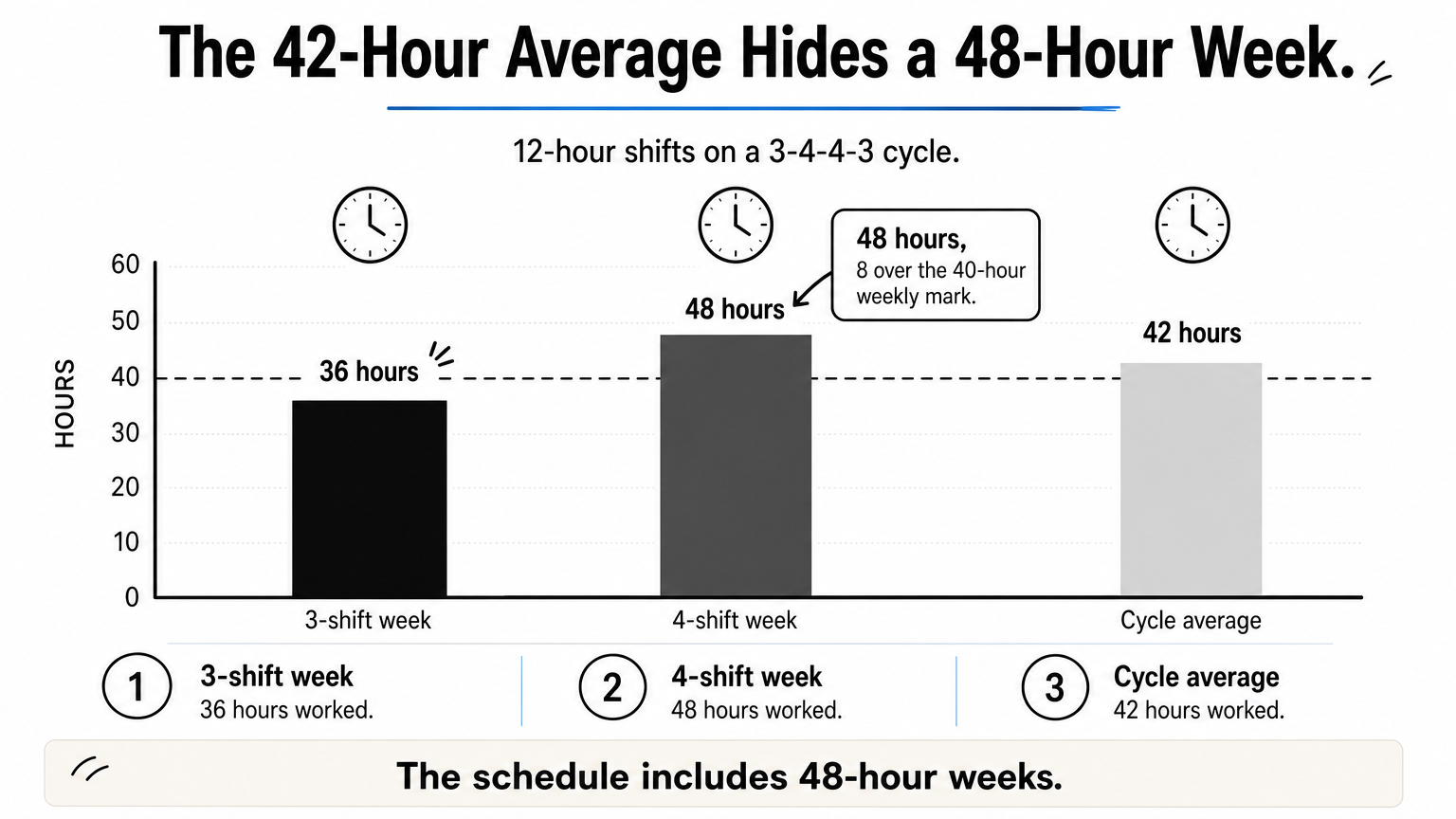
The employee work schedule set includes rotating shift patterns in Word and Excel. You enter crew names against a repeating cycle instead of rewriting dates each week. The 3-4-4-3 schedule, for example, has an employee work three days, take four off, work four, then take three off. Three common 12-hour cycles compare like this:
| Pattern | How it runs | Cycle length | Average hours per week |
|---|---|---|---|
| 3-4-4-3 | 3 on, 4 off, 4 on, 3 off | 14 days | 42 |
| 4 on, 4 off | 4 on, then 4 off | 8 days | 42 |
| 2-2-3 | 2 on, 2 off, 3 on, 2 off, 2 on, 3 off | 14 days | 42 |
Who it suits and how to use it
Warehouses, security teams, care homes, plants and call centers use these patterns. The cost is overtime. Take the 3-4-4-3 cycle with 12-hour shifts. One week has 3 shifts (36 hours) and the next has 4 (48 hours). The 42-hour average hides the 48-hour week, which sits 8 hours over the 40-hour weekly mark when the workweek lines up with the cycle.
Under the federal Fair Labor Standards Act, non-exempt employees earn overtime pay for hours over 40 in a workweek, and some states add daily limits. Price that overtime into the roster before you adopt a pattern, and confirm the rules with the U.S. Department of Labor or your payroll provider.
A rotating pattern is fair to crews, but check the weekly hours before you adopt it.
4. Daily hourly schedule
A daily hourly schedule gives one day a full page, which suits workplaces where tasks, stations or appointments change by the hour. It is the most detailed layout of the five.
What the template covers
Unique Printable’s daily set has 10 Word templates: hourly planners, time-blocking sheets, work-day layouts and routine planners for children. The times are plain text in a Word table, so you change 8:00 to 7:30 by typing over it. Set your working hours once, then print as many copies as you need.
Rows worth including on a daily sheet:
- Time slot
- Staff member or station
- Task or appointment
- Notes for the next shift
Who it suits and how to use it
Salons, clinics, workshops, front desks and service teams benefit most. Managers also use the sheet as a shift handover, with the outgoing lead filling in open tasks before leaving.
To share it online, upload the .docx file to Google Drive, right-click it and choose Open with, then Google Docs. Everyone with the link then sees the same version, which beats emailing copies back and forth.
Use a daily sheet when the hour matters more than the day.
5. Availability form and leave tracker
An availability form and leave tracker don’t schedule anyone, but they prevent most conflicts before they start. Use them to collect constraints before you build the next schedule.

What the template covers
The employee work schedule set includes availability forms and leave trackers alongside its rotas and rosters. Check the file format on each download, because Excel is the better choice when you want balances to calculate. Look for these fields:
- Availability form: name, days available, earliest start, latest finish, constraints, date submitted
- Leave tracker: name, leave type, start date, end date, days taken, balance remaining
Who it suits and how to use it
These suit managers with part-time, student or seasonal staff, and HR or admin staff who track time off. Without them, requests live in texts and hallway conversations, and someone always gets missed.
Collect the forms before you start the next roster, update the tracker when you approve leave, then schedule around both. Eight employees with 10 leave days each means 80 days of absence to plan around, which is too many to remember.
Collect availability first and half your scheduling conflicts never happen.
How to choose, edit and share your template
Choose the template by schedule type, then pick the file format by what you need to do with it. Word handles layout and printing, Excel handles totals, and both open in Google’s tools.
Match the template to your schedule
The table below pairs each situation with a starting point.
| Your situation | Start with | Best file |
|---|---|---|
| Steady hours, same shifts most weeks | Weekly shift schedule | Word, or Excel for hour totals |
| Planning ahead around holidays | Monthly staff roster | Word or Excel |
| 24/7 coverage with crews | Rotating shift pattern | Excel |
| Tasks or stations change hourly | Daily hourly schedule | Word |
| Collecting requests and time off | Availability form and leave tracker | Excel |
Pick the layout first and the file format second.
Edit, print and export
Every template is editable. In Word, click into a cell and type. In Excel, edit the cells and leave formulas alone. For Google’s tools, upload the file to Drive and open it with Google Docs or Google Sheets. For a PDF, use File, then Save As or Export, and choose PDF.
Files are A4 by default, so US users should switch to Letter. In Word, choose Layout, then Size, then Letter. In Excel, use Page Layout, then Size.
In Excel, this formula returns paid hours for a shift, with start times in column B, end times in column C and break minutes in column D. It also handles night shifts that cross midnight:
=MOD(C2-B2,1)*24-D2/60
Format the time columns as time, then sum the daily results to get weekly hours.
Build your own schedule in six steps
If you would rather start from a blank layout, a repeatable process keeps the schedule fair and the edits small.
- Write down opening hours and how many people each shift needs.
- Collect availability and approved leave.
- Assign fixed and senior roles first.
- Fill the remaining shifts, rotating the least popular ones.
- Check weekly hours, breaks and overtime limits.
- Publish early and keep a clean master copy.
Start with the layout that fits
A good workplace schedule template comes down to one question: how often does your schedule repeat? Steady hours point to a weekly sheet. Planning ahead points to a monthly roster. Crews on 24/7 coverage need a rotating pattern, and hourly tasks need a daily sheet. Whatever you choose, collect availability first and check weekly hours before you publish.
Edit the template once, save a master copy and export a PDF for anyone who needs a fixed version. If you want to try these layouts, browse the free employee work schedule templates at Unique Printable and pick the Word or Excel file that fits your team.